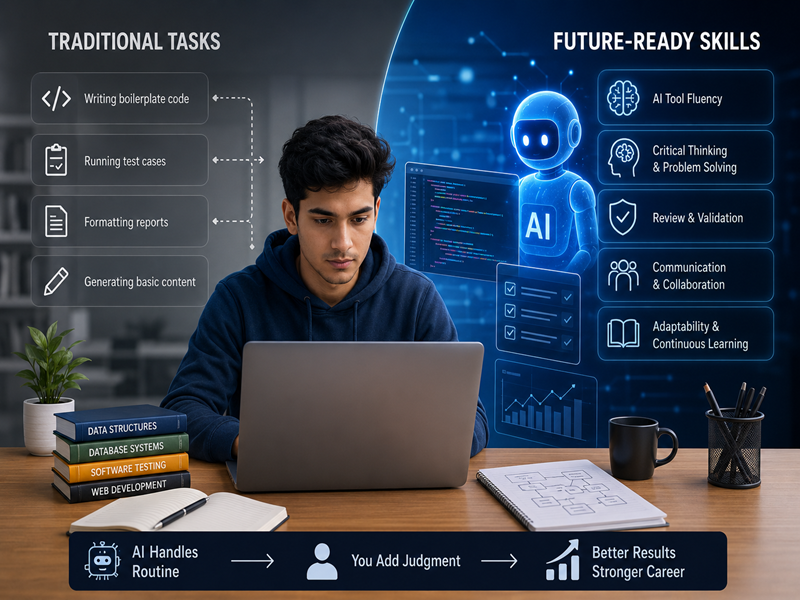
Starting a career in IT can feel exciting. However, many freshers have one common concern: Will AI reduce entry-level IT jobs?
AI is changing the way companies work. Many tasks that once took hours can now be completed faster with AI tools.
However, this does not mean that people are no longer needed. Instead, entry-level IT jobs are changing. Companies now expect freshers to use technology while also showing strong technical and problem-solving skills.
So, what does this mean for someone starting an IT career?
Let’s explore the changes and the skills you need to stay ready for the future.
How AI Is Changing Entry-Level IT Jobs
AI is already becoming part of many IT workflows. It helps professionals complete repetitive tasks faster.
This change is especially noticeable in entry-level roles.
1. Routine Tasks Are Becoming Automated
Many basic tasks can now be supported by AI tools.
For example, AI can help with:
- Writing basic code
- Creating test scripts
- Finding simple errors
- Preparing reports
- Generating content
- Organizing information
As a result, freshers may spend less time on repetitive work.
Instead, they may need to focus more on problem-solving and quality checks.
2. Companies Expect Faster Work
AI tools can create a first draft within seconds. Therefore, companies may expect employees to complete routine tasks more efficiently.
This does not mean working longer hours.
It means learning how to use AI tools properly.
A fresher who knows how to combine technical skills with AI tools can often work more efficiently.
3. Human Judgment Is More Important
AI can generate useful results. However, it can also make mistakes.
For example, AI-generated code may contain bugs. A test script may miss an important scenario. AI-generated content may also contain incorrect information.
This is why human judgment still matters.
Freshers need to check, test, and improve AI-generated work.
4. IT Roles Are Evolving
AI is changing many IT roles. However, it does not automatically make those roles irrelevant.
Software testing is a good example.
AI can help automate repetitive testing tasks. However, testers still need to understand test cases, edge cases, and software quality.
The same idea applies to development, data, and digital marketing.
AI supports the work. People still need to make important decisions.
Skills Freshers Need in the AI Era
AI is changing the workplace. Therefore, freshers need to develop both technical and human skills.
Here are some of the most important ones.
1. Strong Technical Fundamentals
AI tools can generate code and provide answers. However, you still need to understand the basics.
For example, a developer should understand programming logic. A tester should understand testing principles. A data professional should understand statistics and data concepts.
Strong fundamentals help you identify mistakes.
They also help you use AI more effectively.
2. AI Tool Skills
You do not need to become an AI expert to use AI at work.
However, you should understand how common AI tools can support your role.
You can use AI for:
- Generating ideas
- Writing basic code
- Explaining technical concepts
- Creating test cases
- Analyzing information
- Improving productivity
The goal is not to depend on AI.
The goal is to use AI as a useful assistant.
3. Critical Thinking
Critical thinking is becoming more important.
AI can provide an answer, but you still need to decide whether that answer is correct.
Ask questions such as:
- Is the information accurate?
- Does the solution actually work?
- Are there any errors?
- What could go wrong?
- Is there a better solution?
These questions help you use AI responsibly.
4. Debugging and Problem-Solving
AI can create a first version of code. However, that code may not always work.
This is where debugging skills become valuable.
A fresher who can find and fix problems has an important advantage.
The same applies to testing and data roles. You need to understand problems before you can solve them.
5. Communication Skills
Technical skills are important. However, communication also matters.
IT professionals work with managers, developers, testers, clients, and other teams.
You should be able to explain:
- What you worked on
- Why you chose a solution
- What problems you faced
- How you solved them
- What results you achieved
Good communication can help you stand out during interviews and at work.
6. Adaptability and Continuous Learning
Technology changes quickly.
The tools you learn today may change in the future. New AI tools may also become part of your daily workflow.
Therefore, freshers should develop a habit of continuous learning.
You do not need to learn everything.
Instead, focus on learning new skills that are relevant to your career.
How AI Affects Different IT Career Paths
AI is changing different IT fields in different ways.
Full Stack Development
AI coding tools can help developers write basic code faster.
However, developers still need to understand application structure, databases, debugging, and security.
Software Testing
AI can support automated testing and repetitive test tasks.
However, testers still need to design effective test cases and identify unusual situations.
Digital Marketing
AI can help create content, ideas, and ad copy.
However, marketers still need to understand customers, campaign strategy, branding, and analytics.
Data Science
AI can speed up data cleaning and model development.
However, professionals still need to understand data, interpret results, and explain insights clearly.
What Should Freshers Do?
If you are starting your IT career, there is no need to fear AI.
Instead, learn how to work with it.
Start by building strong fundamentals. Then, learn AI tools that are relevant to your chosen field.
Most importantly, practice your skills through projects.
Follow These Steps
Step 1: Choose one IT career path
Pick an area that matches your interests. You could choose development, testing, data, or digital marketing.
Step 2: Learn the fundamentals
Build a strong foundation before depending on AI tools.
Step 3: Practice with AI tools
Use AI to support your learning and projects.
Step 4: Build real projects
Projects help you apply your knowledge to practical problems.
Step 5: Improve your communication
Practice explaining your projects and technical decisions.
Step 6: Keep learning
Follow changes in your field and learn useful new tools.
Common Mistakes to Avoid
AI can make learning easier. However, using it incorrectly can slow your growth.
Avoid these common mistakes:
Depending Completely on AI
Do not copy AI-generated answers without understanding them.
Always review the output.
Ignoring Fundamentals
AI cannot replace your basic knowledge.
Learn the concepts first. Then use AI to work faster.
Avoiding Practical Projects
Watching tutorials is not enough.
Build projects and solve real problems. This will improve your confidence and skills.
Learning Too Many Tools
You do not need every new AI tool.
Choose tools that are useful for your career path.
Final Thoughts
AI is changing entry-level IT jobs. However, it is also creating new ways to work.
Freshers who understand their field and know how to use AI can adapt more easily.
Strong fundamentals are still important. So are critical thinking, problem-solving, communication, and continuous learning.
The goal is not to compete with AI.
The goal is to learn how to work with AI while building skills that require human judgment.
If you are starting your IT career, focus on learning, practice regularly, and stay open to new technology.
Learn the fundamentals. Use AI wisely. Build practical skills. Prepare for the future