

Starting an IT career can be challenging for freshers. Many graduates apply for the same entry-level jobs, but some receive interview calls and job offers sooner than others. The difference is not always about marks or degrees. Employers also look at practical skills, projects, communication, confidence, and job preparation. So, what helps some freshers move faster? 1. They Build Practical Skills Knowing IT concepts is important, but knowing how to use them is even more useful. Freshers who practice their skills through assignments and projects can explain their knowledge better during interviews. For example, a developer can build a website or application. A tester can create test cases and identify bugs. A digital marketer can work on an SEO or advertising project. Practical experience helps turn knowledge into usable skills. 2. They Choose One Career Path Some freshers try to learn everything at once. They start with Java, then move to Python, then try testing, data science, and digital marketing. This can create confusion and slow down progress. Instead, choose one career path and build strong fundamentals first. Possible paths include: Once your foundation is strong, you can expand your skills later. 3. They Start Projects Early Projects are one of the best ways to practice what you learn. Instead of spending months only watching tutorials, start building small projects. A project can help you understand: Projects can also give your resume more value than a list of completed tutorials. 4. They Prepare for Interviews Some freshers start applying for jobs without preparing for interviews. This can lead to avoidable mistakes. Before applying, practice questions related to your chosen field. Also prepare to explain your projects, tools, and technical skills. Mock interviews can help you become more comfortable answering questions. 5. They Improve Communication Skills Technical skills are important, but communication also matters. During an interview, you need to explain your ideas clearly. You may also need to describe a project or explain how you solved a problem. Good communication does not mean using complicated English. It means being able to explain your thoughts in a clear and confident way. 6. They Know Their Resume A common mistake is adding skills to a resume without knowing them well. If you mention Java, Python, Selenium, SQL, or any other tool, be ready for questions about it. Your resume should represent what you can actually do. A simple and honest resume is better than a long resume filled with skills you cannot explain. 7. They Use Their Learning Time Wisely Consistent practice can make a big difference. Spending one or two focused hours every day can be more useful than studying for many hours once a week. A simple routine can include: Small efforts become valuable when you repeat them consistently. 8. They Learn From Mistakes Rejection is a normal part of the job search. A fresher may face several unsuccessful interviews before receiving an offer. Instead of giving up, use feedback to improve. Ask yourself: Each interview can become a learning experience. 9. They Get Guidance When Needed Learning alone is possible, but beginners can spend a lot of time figuring out what to learn next. Mentors and trainers can provide direction, answer questions, and help identify weak areas. Structured training can also provide a clear learning path with practical assignments and projects. 10. They Start Applying at the Right Time Some freshers wait until they feel they know everything. That day may never come. You do not need to know every technology before applying for an entry-level position. You need a strong foundation, practical skills, relevant projects, and the ability to learn. Once you are reasonably prepared, start applying and continue improving alongside your job search. What Can Freshers Do to Get Job-Ready Faster? A simple approach can make your preparation more focused: Choose → Learn → Practice → Build → Prepare → Apply Choose a career path that matches your interests. Learn the fundamentals. Practice regularly. Build projects. Prepare for interviews. Then start applying for suitable roles. This approach is more effective than constantly switching between courses and technologies. Final Thoughts Some freshers get IT jobs faster because they prepare with a clear goal. They focus on practical skills instead of only collecting certificates. They build projects, improve communication, prepare for interviews, and keep learning after facing rejection. Getting your first IT job is not about knowing everything. It is about becoming job-ready, confident, and consistent. If you are starting your IT career, focus on one path, practice every day, build real projects, and prepare for the skills employers expect. With the right direction and consistent effort, you can make your journey toward your first IT job much more focused.

Why FMI Is a Trusted IT Training Institute in Hadapsar
Choosing the right IT training institute is an important career decision. Many students look for an institute that offers practical training, experienced trainers, and career support. If you are searching for a trusted IT training institute in Hadapsar, Floating Minds Institute (FMI) can be a good option for building job-ready skills. FMI focuses on practical learning, small batches, projects, and career guidance. These features can help students learn with more confidence and prepare for the IT job market. What Should You Look for in an IT Training Institute? Choosing an institute should not be based only on fees or advertisements. Before joining a course, check whether the institute offers: These factors can make the learning experience more useful and structured. Why Is FMI a Trusted IT Training Institute in Hadapsar? 1. Practical Learning Learning IT skills requires regular practice. At FMI, students can apply concepts through assignments and practical activities. This helps them understand how technical skills work in real situations. Practical learning can also help students feel more confident while working on projects. 2. Experienced Trainers A good trainer can make difficult topics easier to understand. FMI provides guidance from trainers with practical knowledge. Students can learn concepts through examples and hands-on exercises. Trainers can also help students identify mistakes and improve their skills. 3. Small Batch Training Large classrooms can make it difficult for every student to get personal attention. FMI follows a small batch approach. This allows students to interact with trainers more easily. Students can ask questions, clear doubts, and get guidance during training. This can be especially helpful for beginners. 4. Job-Oriented Courses IT skills are constantly changing. Students need to learn skills that are useful in the current job market. FMI offers several career-focused courses, including: Students can choose a course based on their interests and career goals. 5. Hands-On Projects Projects help students put their knowledge into practice. Instead of only studying theory, students can work on practical tasks related to their chosen field. For example, development students can build applications. Testing students can work on test cases and automation. Digital marketing students can practice SEO and campaign activities. Projects can also become part of a student’s portfolio. 6. Interview Preparation Technical knowledge is important, but interview preparation is also necessary. FMI supports students with activities such as: This can help students prepare for the job search with greater confidence. 7. Courses for Beginners Starting an IT career can feel difficult if you have no technical background. A structured course can help beginners learn concepts step by step. FMI courses can be considered by: Students can select a course based on their interests, skills, and career plans. Flexible Batch Timings Students and working professionals often have different schedules. FMI offers batches between 8 AM and 7 PM, Monday to Saturday. Flexible timings can make it easier to balance training with college, work, or other responsibilities. Practical Skills Matter More Than Certificates A certificate shows that you completed a course. However, employers also look for practical knowledge. Students should learn how to: Practical training can help students develop these skills alongside their course. How to Choose the Right FMI Course Different IT careers require different skills. Full Stack Development This can be a good choice if you enjoy coding and building websites or applications. Software Testing Testing may suit you if you enjoy finding errors, checking details, and solving problems. Data Science and Data Analytics These paths can suit students who enjoy numbers, data, patterns, and analysis. Digital Marketing Digital marketing can be a good option if you enjoy SEO, advertising, content, social media, and analytics. Python and C & C++ These courses can help beginners build strong programming fundamentals. Understanding your interests can help you choose a suitable career path. Why Practical IT Training Can Improve Your Career Preparation Learning from videos and books can give you theoretical knowledge. However, practical training gives you opportunities to apply that knowledge. When students work on projects and assignments, they can learn how to solve problems and handle mistakes. They also get opportunities to discuss their work with trainers. This practical experience can be useful during interviews and early career stages. What Makes a Good Learning Environment? A good training environment should encourage students to ask questions and practice regularly. Students should feel comfortable discussing their doubts with trainers. Small batches, practical sessions, and regular feedback can help create such an environment. The goal should be to understand the subject rather than simply complete the syllabus. Final Thoughts Finding a trusted IT training institute in Hadapsar requires careful research. Look beyond course fees and advertisements. Consider practical training, trainer experience, batch size, projects, course content, and career support. Floating Minds Institute focuses on these areas to help students build practical IT skills. Whether you are a fresher, college student, beginner, career changer, or working professional, the right training can help you take a confident step toward your IT career. Learn the basics. Practice your skills. Build projects. Prepare for your future.
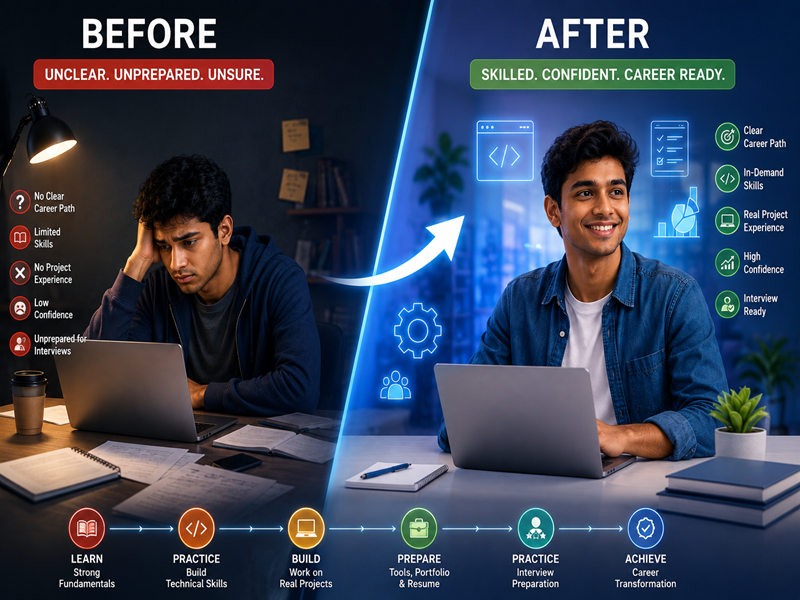
Before and After: How an IT Course Can Transform a Fresher’s Career in 6 Months
Starting a career in IT can feel confusing for a fresher. You may have a degree, but still wonder what companies expect from you. The gap between academic knowledge and job-ready skills can be challenging. A structured IT course can help bridge that gap through practical learning, projects, mentorship, and interview preparation. Here is a simple six-month before-and-after journey that shows how focused IT training can help a fresher become more confident and career-ready. Before Joining an IT Course Many freshers start their job search with limited practical experience. They may have: Having a degree is valuable, but employers may also look for practical skills. This is where structured training can help. Month 1: Understanding the Basics The first step is building strong fundamentals. A fresher can choose a career path based on their interests, such as: The focus should be on understanding the basics instead of rushing through advanced topics. Before: Unsure about what to learn. After: Clear about the chosen career path and learning goals. Month 2: Building Technical Skills Once the basics are clear, students can start developing job-related skills. For example, a Full Stack student may learn HTML, CSS, JavaScript, Java, and databases. A Software Testing student may learn manual testing, test cases, Selenium, and JIRA. A Digital Marketing student may learn SEO, Google Ads, social media marketing, and analytics. Before: Mostly theoretical knowledge. After: Better understanding of practical technical concepts. Month 3: Working on Projects Projects are an important part of IT learning. Instead of only watching tutorials, students can start applying their knowledge. They may build a website, test an application, analyze data, or create a digital marketing campaign. Projects help students understand how different concepts work together. Before: No real project experience. After: Practical work that can be added to a portfolio. Month 4: Learning Industry Tools IT professionals use different tools in their daily work. During this stage, students can become familiar with tools used in their chosen field. For example: Before: Limited knowledge of professional tools. After: More confidence using relevant industry tools. Month 5: Building a Portfolio A resume can tell employers what you have learned. A portfolio can show them what you can do. Students can organize their best projects and highlight the skills used in each one. They can also identify weak areas and spend extra time improving them. Before: A resume with mostly academic information. After: A resume supported by practical projects and relevant skills. Month 6: Preparing for the Job Market Technical knowledge is only one part of getting hired. Students also need to prepare for interviews. The final stage can include: Students can also start applying for suitable internships and entry-level roles. Before: Nervous about interviews. After: Better prepared to explain skills, projects, and career goals. The Transformation: Before vs After Before IT Training After 6 Months of Structured Learning Unclear career direction Clear career path Mostly theoretical knowledge Practical technical skills Little project experience Portfolio projects Limited tool knowledge Experience with industry tools Low interview confidence Regular interview practice Basic resume Skill-focused resume Unsure about job applications Better job-search preparation The exact results will differ from one student to another. Progress also depends on consistency, practice, and effort. What Makes the Difference? An IT course does not create overnight success. The real transformation comes from consistent learning and practical application. Students need to attend classes, complete assignments, work on projects, ask questions, and practice outside the classroom. Mentorship can make this process easier by providing direction and feedback. Why Practical IT Training Matters Many freshers know the theory but struggle to apply it. Practical training helps close this gap. When students work on projects, they learn how to solve problems and handle mistakes. They also become more comfortable explaining their work. These experiences can be useful during technical interviews. Is Six Months Enough? Six months can provide a strong foundation for an entry-level IT career when the learning plan is structured and focused. However, students should not treat six months as a guarantee of a job. Career progress depends on several factors, including: The goal should be to become job-ready, not simply to finish a course. Final Thoughts The journey from a fresher with limited practical experience to a confident job seeker does not happen overnight. A structured six-month IT course can help students build fundamentals, learn industry tools, complete projects, create a portfolio, and prepare for interviews. The biggest change is often not just the skills on a resume. It is the confidence to say: “I know what I have learned, I can demonstrate it, and I am ready to keep growing.” For freshers looking to start an IT career, the right training, consistent practice, and practical experience can make the journey much clearer.
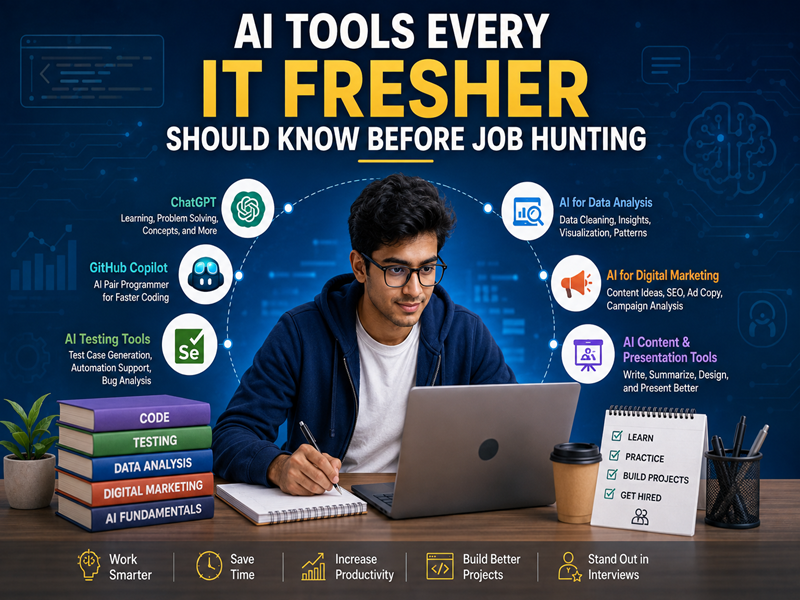
AI Tools Every IT Fresher Should Know Before Job Hunting
Starting an IT career today is different from starting one a few years ago. AI tools are now part of many daily workflows. They can help developers write code, testers create test cases, marketers analyze campaigns, and data professionals work with information faster. For freshers, the goal is not to learn every AI tool available. Instead, focus on understanding how AI can support your chosen IT career. Here are some useful AI tools and skills every IT fresher should know before job hunting. Why Should Freshers Learn AI Tools? Companies are increasingly using AI to improve productivity. Knowing how to use these tools can help you complete routine tasks faster. AI knowledge can also show employers that you are willing to learn new technology. However, AI should support your skills, not replace them. You still need strong fundamentals, problem-solving skills, and practical experience. 1. ChatGPT for Learning and Problem Solving ChatGPT can be useful for freshers across different IT fields. You can use it to: For example, a beginner learning Java can ask ChatGPT to explain a programming concept with a simple example. The important thing is to understand the answer instead of simply copying it. 2. GitHub Copilot for Coding For aspiring developers, AI coding assistants can help speed up development. GitHub Copilot can assist with: Freshers should first understand programming fundamentals. An AI coding assistant becomes more useful when you know how to check whether the generated code is correct. 3. AI Tools for Software Testing AI is also becoming useful in software testing. AI-assisted tools can help testers create test ideas, analyze requirements, and support automation workflows. Freshers should still learn important testing concepts such as: AI can make testing faster, but good testing still requires human judgment. 4. AI Tools for Digital Marketing AI has become a useful part of digital marketing. Marketers can use AI for: However, knowing marketing fundamentals is still essential. A fresher should understand SEO, paid advertising, content marketing, analytics, and audience research before depending heavily on AI. 5. AI Tools for Data Analysis Data professionals can use AI to work with datasets and understand information more efficiently. AI can assist with: Freshers should also learn Python, statistics, spreadsheets, databases, and data visualization. These fundamentals help you check whether AI-generated results make sense. 6. AI-Powered Presentation and Content Tools Freshers may also use AI tools to prepare presentations, documents, and professional content. These tools can help with: Good communication is an important workplace skill. AI can help improve your first draft, but you should always review the final content. 7. Learn How to Write Better Prompts Knowing how to communicate with AI is becoming an important skill. Instead of asking: “Explain Java.” Try: “Explain Java inheritance for a beginner with a simple example and three practice questions.” A clear prompt usually gives a more useful response. Practice including: 8. Learn to Verify AI Output This is one of the most important AI skills for freshers. AI can produce incorrect code, outdated information, or inaccurate explanations. Before using AI-generated work, ask: Never assume that an AI answer is automatically correct. AI Skills by IT Career Different career paths require different AI skills. Career Path Useful AI Applications Full Stack Development Code assistance, debugging, documentation Software Testing Test ideas, automation support, test analysis Digital Marketing Content, SEO research, ads, analytics Data Science Data analysis, coding, visualization, research Data Analytics Data exploration, reports, insights IT Support Troubleshooting and documentation You do not need to master every tool on this list. Choose tools based on the career you want to pursue. Common Mistakes Freshers Should Avoid Using AI Without Understanding Copying an AI-generated solution may help you finish a task, but it does not build your skills. Learning Too Many Tools There are hundreds of AI tools available. Trying to learn all of them can waste time. Focus on a few tools that are relevant to your career. Ignoring Fundamentals AI cannot replace basic knowledge. Developers need programming skills. Testers need testing concepts. Marketers need marketing fundamentals. Data professionals need analytical skills. Depending on AI for Everything Use AI as an assistant, not as a replacement for your own thinking. How Freshers Can Prepare for AI-Driven Jobs A practical approach is to combine fundamentals + AI tools + projects. Start by learning the basics of your chosen field. Then introduce AI tools into your daily practice. For example: Learn → Practice → Use AI → Verify → Improve → Build This approach helps you develop both technical knowledge and AI confidence. Build Projects Using AI Responsibly Projects are one of the best ways to demonstrate your skills. Instead of simply mentioning AI tools on your resume, show how you used them. For example: During interviews, be prepared to explain what you did and how you verified the AI output. Final Thoughts AI tools are becoming valuable skills for IT freshers. They can help you learn faster, improve productivity, and prepare for real workplace tasks. But learning AI tools alone is not enough. Build strong fundamentals, practice regularly, work on projects, and learn how to verify AI-generated results. The best fresher is not the person who knows the most AI tools. It is the person who knows how to use AI effectively while understanding the work behind it.
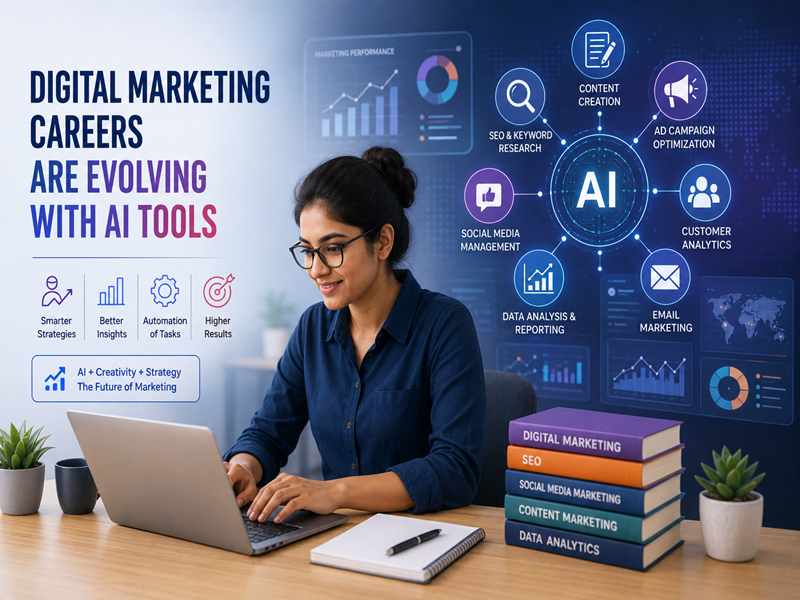
How Digital Marketing Careers Are Evolving with AI Tools
Digital marketing is changing quickly. AI tools are now helping marketers create content, analyze data, manage campaigns, and understand customers. This change does not mean that digital marketing careers are disappearing. Instead, the role of a digital marketer is becoming more strategic. Marketers who know how to use AI while understanding the basics of marketing can work faster, make better decisions, and create more effective campaigns. How AI Is Changing Digital Marketing AI can handle many repetitive tasks that once took marketers hours. This allows professionals to spend more time on strategy, creativity, and decision-making. Here are some major changes happening in digital marketing. 1. Faster Content Creation AI tools can help marketers create content ideas, outlines, captions, emails, and ad copy. However, good marketing still needs human creativity. Marketers must understand the audience, brand voice, and purpose of the content. AI can assist with the process, but marketers still need to review and improve the final result. 2. SEO Is Becoming More Data-Driven AI is changing how marketers research keywords, analyze competitors, and plan content. Marketers can use AI to identify topics and organize large amounts of information faster. However, SEO still requires an understanding of search intent, quality content, technical SEO, and user experience. The future of SEO will need both marketing knowledge and AI skills. 3. Better Advertising Campaigns AI is also changing paid advertising. Platforms can help marketers with audience targeting, bidding, creative testing, and campaign optimization. This means digital marketers need to understand more than simply creating an advertisement. They also need to know how to: 4. Data Analysis Is Becoming Easier Digital marketers work with large amounts of data. AI can help summarize reports, identify trends, and highlight unusual changes in campaign performance. This allows marketers to spend less time collecting information and more time understanding what the data means. A marketer who can turn data into useful business decisions will remain valuable. 5. Social Media Marketing Is Changing AI tools can help with content ideas, captions, scheduling, audience analysis, and creative concepts. But social media success still depends on understanding people. Marketers need to know what their audience likes, what problems they face, and what type of content encourages engagement. Human understanding remains important. 6. Personalization Is Becoming More Important Customers expect brands to provide relevant experiences. AI can help marketers analyze customer behavior and create more personalized messages. For example, businesses can use customer data to recommend products, customize emails, or create targeted campaigns. This creates new opportunities for marketers who understand both customer psychology and technology. Skills Digital Marketers Need in the AI Era AI tools are useful, but knowing how to use them is only one part of the job. Digital marketers should also develop strong marketing fundamentals. Marketing Fundamentals Understand SEO, social media, paid advertising, content marketing, email marketing, and analytics. AI Tool Knowledge Learn how to use AI tools for research, content creation, analysis, and campaign planning. Data Analysis Learn how to read marketing metrics and understand what the numbers mean. Creativity AI can generate ideas, but marketers need creativity to develop unique campaigns and brand messages. Critical Thinking Always review AI-generated information. AI can make mistakes, so marketers need to check facts and make informed decisions. Communication Marketers often work with designers, developers, sales teams, and business owners. Clear communication remains an important skill. Will AI Replace Digital Marketers? AI is more likely to change digital marketing jobs than completely replace them. Routine tasks may become more automated. At the same time, companies will need people who can manage AI tools and make strategic decisions. A marketer who understands AI + marketing + data can have an advantage in the changing job market. What Should Beginners Learn? If you are planning to start a digital marketing career, focus on the basics first. A useful learning path can include: This approach helps you develop real skills instead of depending only on AI tools. Why Practical Training Matters AI tools are changing quickly. Learning one tool is not enough. Students need to understand why a marketing strategy works and how to use different tools to achieve business goals. Practical projects can help learners gain experience with SEO, advertising, content, analytics, and AI-assisted marketing. This experience can also make it easier to demonstrate skills during interviews. Final Thoughts AI is changing digital marketing careers, but it is also creating new opportunities. The role of a digital marketer is moving from repetitive task execution toward strategy, creativity, analysis, and decision-making. If you are starting your career today, do not focus only on learning AI tools. Build strong marketing fundamentals and learn how to use AI as a productivity tool. The future belongs to marketers who can combine human creativity with AI-powered efficiency.
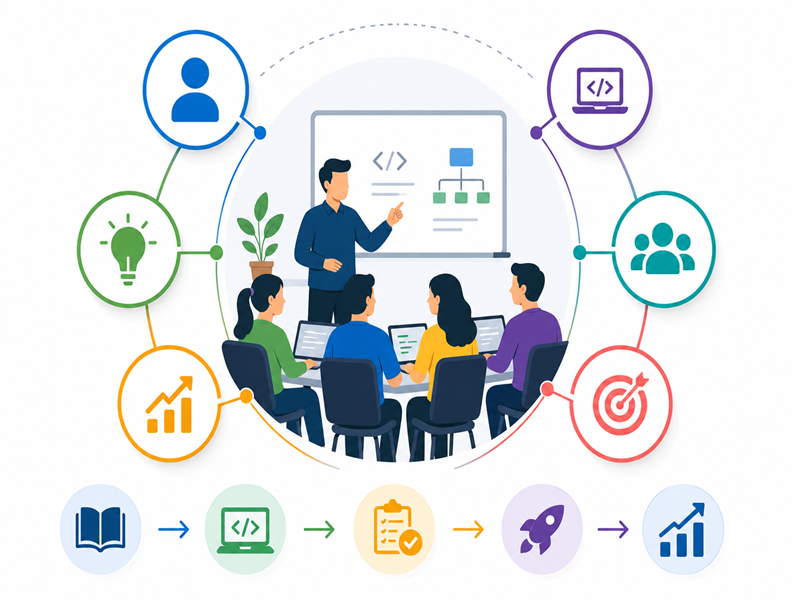
How Micro Batch Training Improves Learning Outcomes for Students
Choosing the right learning environment can make a big difference in how students understand and apply new skills. In traditional classrooms, large batches can make it difficult for trainers to give every student enough attention. Micro batch training offers a more focused learning experience. With fewer students in each batch, trainers can spend more time answering questions, checking progress, and helping students improve. For technical courses such as Full Stack Development, Software Testing, Data Science, and Digital Marketing, this approach can be especially useful. What Is Micro Batch Training? Micro batch training means teaching a small group of students in one class. Instead of having a crowded classroom, students learn in a smaller group. This allows trainers to interact more closely with each learner. Students can ask questions, practice concepts, and receive feedback during the session. The goal is simple: better attention, better practice, and better understanding. 1. Students Get More Individual Attention In a large class, trainers may not have enough time to focus on every student. Some students may understand a topic quickly, while others may need more explanation. Micro batches make it easier for trainers to identify these differences. Students can receive individual guidance when they need it. 2. Students Can Ask More Questions Questions are an important part of learning. However, students may hesitate to ask questions in a large classroom. A smaller group can create a more comfortable learning environment. Students can ask questions during the session and get answers before moving to the next topic. 3. Trainers Can Understand Student Progress Every student learns at a different pace. With a smaller batch, trainers can track student progress more closely. They can identify topics that students find difficult and spend more time explaining them. This helps prevent small learning gaps from becoming bigger problems. 4. More Time for Practical Learning Technical skills require practice. Students need to write code, test applications, analyze data, or create marketing campaigns to understand how concepts work. Micro batches can provide more opportunities for hands-on activities. Instead of only listening to a lecture, students can spend more time applying what they learn. 5. Better Doubt-Solving A small doubt can sometimes stop a student from understanding an entire topic. In a large class, it may be difficult to get immediate help. Micro batch training allows trainers to address doubts more effectively. This can help students move forward with greater clarity. 6. Better Student-Trainer Interaction Learning becomes more engaging when students can interact with their trainer. In a smaller group, students can participate in discussions, answer questions, and share their approach to problems. This creates a more interactive classroom experience. 7. More Confidence During Practice Students often become more confident when they receive regular feedback. A trainer can review their assignments, explain mistakes, and suggest improvements. Over time, students become more comfortable solving problems independently. This confidence can also help during technical interviews. 8. Easier Learning for Beginners Beginners may need extra support when learning technical subjects. Programming concepts, testing tools, databases, or analytics can seem difficult at first. Micro batch training gives beginners more opportunities to ask questions and practice with guidance. This can make the learning process less overwhelming. 9. Stronger Focus on Projects Projects help students connect theory with practical work. In a micro batch, trainers can provide closer project guidance. Students can discuss their ideas, solve problems, and improve their projects with feedback. This helps them understand how their skills can be used in real-world situations. 10. Better Learning Outcomes The main benefit of micro batch training is the overall learning experience. Students get: These factors can help students understand concepts instead of simply memorizing them. Micro Batch Training vs Large Batches Micro Batch Training Large Batch Training More individual attention Limited individual attention Easier doubt-solving Questions may take longer More student participation Less participation Better progress tracking Harder to track everyone More practical interaction More focus on group teaching The right choice depends on the student’s learning style. However, students who prefer personal guidance may benefit from a smaller classroom. Who Can Benefit From Micro Batch Training? Micro batch training can be useful for: It is especially helpful for learners who need regular feedback and practical guidance. Why Practical Training Matters Learning a technical skill is not only about completing a syllabus. Students need to understand how to use their knowledge. For example, a programming student should write and debug code. A testing student should practice test cases. A digital marketing student should work on campaigns and analytics. Practical learning becomes easier when trainers have enough time to guide each student. Final Thoughts Micro batch training creates a more focused and interactive learning environment. Students receive more attention, ask questions freely, practice more, and get regular feedback. For students preparing for an IT career, these benefits can make technical learning more effective. A smaller batch can create more opportunities to learn, practice, and improve.
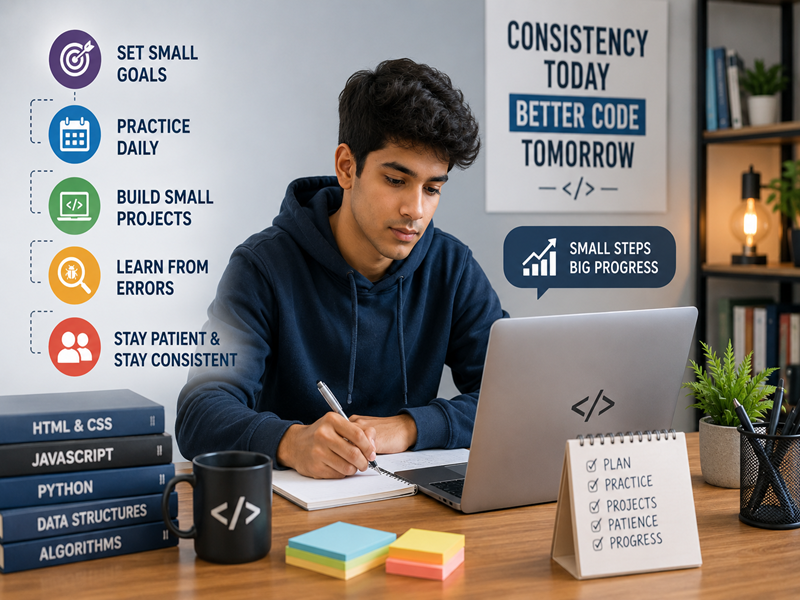
How to Stay Consistent While Learning Coding as a Beginner
Learning coding as a beginner can be challenging. You have to understand new concepts, practice regularly, and solve problems on your own. At times, you may feel confused or lose motivation. The good news is that you do not need to study for many hours every day. A simple routine and regular practice can help you make steady progress. Why Consistency Matters in Coding Coding is a practical skill. Reading tutorials can help you understand concepts, but writing code helps you remember them. Regular practice can help you: Even 30–60 minutes of practice each day can make a difference. 1. Set Small and Clear Goals Avoid trying to learn everything at once. Choose one topic and focus on it. For example, you can learn variables today and practice loops tomorrow. Break large goals into smaller tasks. This makes learning easier and helps you see progress. 2. Create a Simple Coding Routine Set a fixed time for coding each day. For example: You can adjust the routine based on your schedule. The important part is to follow it regularly. 3. Practice More Than You Watch Watching coding tutorials is useful, but it should not replace practice. After learning a concept, write some code yourself. Try changing the example from the tutorial. Then create a small problem and solve it without looking at the answer. This helps you develop independent problem-solving skills. 4. Start With Small Projects Projects make coding more interesting. Start with simple projects such as: Once you become comfortable, you can move to larger projects. 5. Learn From Coding Errors Errors are part of programming. Your code may not work on the first attempt. Instead of giving up, read the error message and find the cause. Ask yourself: What went wrong? Why did it happen? How can I fix it? Learning to debug will make you a better programmer. 6. Follow One Learning Path There are thousands of coding tutorials online. Jumping between different courses can create confusion. Choose one programming language and follow a structured learning path. For example, if you choose Java, focus on Java fundamentals before moving to advanced frameworks. 7. Track Your Progress Keep a simple record of what you learn. You can write down: Seeing your progress can motivate you to continue. 8. Do Not Compare Yourself With Others Every beginner learns at a different speed. Someone may understand a concept quickly, while you may need more practice. That is normal. Focus on your own improvement instead of comparing yourself with other students or developers. 9. Take Breaks Consistency does not mean coding all day. If you feel tired or frustrated, take a short break. Return to the problem later with a fresh mind. A sustainable routine is better than studying intensely for a few days and then stopping. 10. Get Guidance When You Need It Sometimes, a small doubt can take hours to solve. Do not hesitate to ask a trainer, mentor, or experienced developer for help. Proper guidance can help you understand difficult topics faster and avoid common mistakes. 11. Use AI as a Learning Tool AI tools can also support your coding journey. You can use AI to: However, do not copy solutions without understanding them. Try to solve the problem yourself first. Then use AI to improve your understanding. A Simple Weekly Coding Plan You can follow a simple weekly routine: Monday: Learn a new conceptTuesday: Practice basic problemsWednesday: Solve coding exercisesThursday: Revise previous topicsFriday: Practice problem-solvingSaturday: Work on a small projectSunday: Review your progress You can change this schedule according to your routine. Common Mistakes to Avoid Beginners often make a few common mistakes: Avoiding these mistakes can make your learning journey smoother. Final Thoughts Learning coding takes time and practice. You do not need to master everything in a few weeks. Set small goals, follow a routine, practice regularly, and build simple projects. When you make mistakes, use them as learning opportunities. Most importantly, stay consistent even when progress feels slow. Learn today. Practice tomorrow. Keep building until coding becomes a skill you can trust.

How FMI’s Placement Cell Helped 100+ Students Land Their First IT Job
Getting your first IT job can be challenging. Many freshers have the right qualifications but do not know how to approach the job market. They may struggle with resumes, interviews, or technical questions. Some students also find it difficult to understand what companies expect from freshers. This is where placement support can make a difference. At Floating Minds Institute (FMI), the placement cell helps students prepare for the transition from training to employment. The focus is not only on finding job opportunities. It is also on helping students become confident and interview-ready. Why Placement Support Matters Completing an IT course is an important first step. However, getting a job requires more than technical knowledge. Freshers also need to know how to: Without proper guidance, students may feel lost during their job search. A placement cell can provide the structure and support they need. How FMI’s Placement Cell Supports Students 1. Resume Preparation Your resume is often the first thing a recruiter sees. FMI helps students understand how to present their skills clearly. Students can highlight relevant courses, projects, technical skills, and other experience. A focused resume can make it easier for recruiters to understand a candidate’s profile. 2. Interview Preparation Interviews can be stressful for freshers. FMI helps students prepare for common interview questions. Training can also focus on technical topics related to the student’s chosen field. Students can practice explaining their skills and projects before facing actual interviews. This preparation can help improve confidence. 3. Technical Interview Guidance Different IT roles require different technical knowledge. For example, a developer may face programming questions. A tester may need to explain testing concepts. A digital marketer may be asked about SEO or advertising. FMI helps students prepare according to their chosen career path. This makes interview preparation more focused and practical. 4. Mock Interview Practice Practice can make interviews easier. Mock interviews allow students to experience a similar environment before attending an actual interview. Students can practice: Feedback can then help students identify areas that need improvement. 5. Project Explanation Practice Projects are an important part of an IT fresher’s resume. However, adding a project to a resume is not enough. Students should also be able to explain what they built and how they built it. FMI encourages students to understand their projects properly. Students can prepare to explain: This can help them answer project-related questions with greater confidence. 6. Job Opportunity Guidance Finding suitable jobs can be difficult for freshers. Students may not know which positions match their skills. They may also apply for roles that do not fit their experience. Placement support can help students understand suitable job roles and opportunities. This gives students a more organized approach to their job search. 7. Support for Different IT Careers FMI offers training across several IT fields. Students can prepare for roles related to: Placement preparation can be aligned with the student’s chosen field. This helps students focus on the skills and questions that matter for their target role. From Training to Job: A Simple Journey The journey from learning to employment does not happen overnight. It usually involves several steps. Step 1: Learn the fundamentals Students first build knowledge in their chosen field. Step 2: Practice the skills Hands-on assignments help students apply what they learn. Step 3: Build projects Projects provide practical experience and strengthen the resume. Step 4: Prepare the resume Students learn how to present their skills and projects professionally. Step 5: Practice interviews Mock interviews help students improve their answers and communication. Step 6: Apply for jobs Students begin applying for relevant positions and attending interviews. Step 7: Learn from feedback Every interview provides an opportunity to improve. This process can help freshers approach the job search with more confidence. Why Practical Skills Matter Employers often look beyond certificates. They want candidates who can understand problems and apply their knowledge. That is why practical projects are important. At FMI, students can combine classroom learning with hands-on practice. This gives them an opportunity to understand how their skills work in practical situations. The placement cell then helps students prepare to present these skills during interviews. Helping Students Build Confidence For many freshers, the biggest challenge is not learning technology. It is confidence. Students may know the answer but hesitate during an interview. Regular practice can help reduce this hesitation. Resume guidance, mock interviews, project discussions, and career support can help students feel better prepared. Confidence grows when students know what to expect. What Makes Placement Support Valuable? A useful placement process should offer more than job updates. Students also need guidance throughout the preparation process. FMI’s placement support focuses on areas such as: Together, these steps can create a smoother transition from training to the job search. 100+ Students and Their IT Career Journey FMI’s placement cell has supported 100+ students in their journey toward their first IT job. Every student’s journey is different. Some may be fresh graduates. Others may be changing careers or starting without a technical background. However, the goal remains the same: build the right skills and prepare for real job opportunities. The combination of technical training and placement guidance can help students take that next step. Is Placement Support Enough to Get a Job? Placement support can provide guidance and opportunities. However, students also need to put in consistent effort. Your results depend on several factors, including: Students who actively practice and improve their skills are better prepared to make use of placement opportunities. Final Thoughts Getting your first IT job can feel difficult. However, the right training and guidance can make the process more structured. FMI’s placement cell supports students through resume preparation, interview practice, project guidance, and job search support. The goal is simple: help students move from learning IT skills to confidently applying for IT jobs. If you are planning to start your IT career, choose a training program that supports both skill development and career preparation. Learn the skills. Build your confidence. Prepare for your first IT
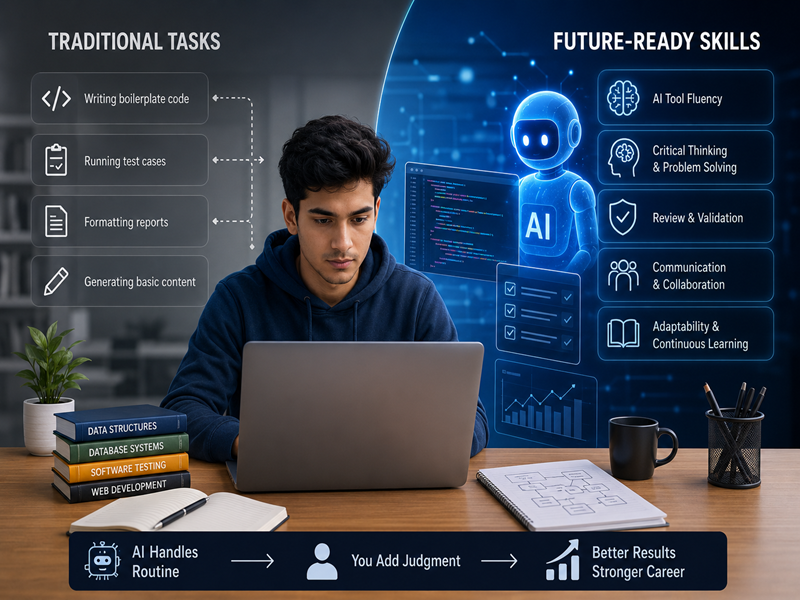
How AI Is Changing Entry-Level IT Jobs and the Skills You Need to Adapt
Starting a career in IT can feel exciting. However, many freshers have one common concern: Will AI reduce entry-level IT jobs? AI is changing the way companies work. Many tasks that once took hours can now be completed faster with AI tools. However, this does not mean that people are no longer needed. Instead, entry-level IT jobs are changing. Companies now expect freshers to use technology while also showing strong technical and problem-solving skills. So, what does this mean for someone starting an IT career? Let’s explore the changes and the skills you need to stay ready for the future. How AI Is Changing Entry-Level IT Jobs AI is already becoming part of many IT workflows. It helps professionals complete repetitive tasks faster. This change is especially noticeable in entry-level roles. 1. Routine Tasks Are Becoming Automated Many basic tasks can now be supported by AI tools. For example, AI can help with: As a result, freshers may spend less time on repetitive work. Instead, they may need to focus more on problem-solving and quality checks. 2. Companies Expect Faster Work AI tools can create a first draft within seconds. Therefore, companies may expect employees to complete routine tasks more efficiently. This does not mean working longer hours. It means learning how to use AI tools properly. A fresher who knows how to combine technical skills with AI tools can often work more efficiently. 3. Human Judgment Is More Important AI can generate useful results. However, it can also make mistakes. For example, AI-generated code may contain bugs. A test script may miss an important scenario. AI-generated content may also contain incorrect information. This is why human judgment still matters. Freshers need to check, test, and improve AI-generated work. 4. IT Roles Are Evolving AI is changing many IT roles. However, it does not automatically make those roles irrelevant. Software testing is a good example. AI can help automate repetitive testing tasks. However, testers still need to understand test cases, edge cases, and software quality. The same idea applies to development, data, and digital marketing. AI supports the work. People still need to make important decisions. Skills Freshers Need in the AI Era AI is changing the workplace. Therefore, freshers need to develop both technical and human skills. Here are some of the most important ones. 1. Strong Technical Fundamentals AI tools can generate code and provide answers. However, you still need to understand the basics. For example, a developer should understand programming logic. A tester should understand testing principles. A data professional should understand statistics and data concepts. Strong fundamentals help you identify mistakes. They also help you use AI more effectively. 2. AI Tool Skills You do not need to become an AI expert to use AI at work. However, you should understand how common AI tools can support your role. You can use AI for: The goal is not to depend on AI. The goal is to use AI as a useful assistant. 3. Critical Thinking Critical thinking is becoming more important. AI can provide an answer, but you still need to decide whether that answer is correct. Ask questions such as: These questions help you use AI responsibly. 4. Debugging and Problem-Solving AI can create a first version of code. However, that code may not always work. This is where debugging skills become valuable. A fresher who can find and fix problems has an important advantage. The same applies to testing and data roles. You need to understand problems before you can solve them. 5. Communication Skills Technical skills are important. However, communication also matters. IT professionals work with managers, developers, testers, clients, and other teams. You should be able to explain: Good communication can help you stand out during interviews and at work. 6. Adaptability and Continuous Learning Technology changes quickly. The tools you learn today may change in the future. New AI tools may also become part of your daily workflow. Therefore, freshers should develop a habit of continuous learning. You do not need to learn everything. Instead, focus on learning new skills that are relevant to your career. How AI Affects Different IT Career Paths AI is changing different IT fields in different ways. Full Stack Development AI coding tools can help developers write basic code faster. However, developers still need to understand application structure, databases, debugging, and security. Software Testing AI can support automated testing and repetitive test tasks. However, testers still need to design effective test cases and identify unusual situations. Digital Marketing AI can help create content, ideas, and ad copy. However, marketers still need to understand customers, campaign strategy, branding, and analytics. Data Science AI can speed up data cleaning and model development. However, professionals still need to understand data, interpret results, and explain insights clearly. What Should Freshers Do? If you are starting your IT career, there is no need to fear AI. Instead, learn how to work with it. Start by building strong fundamentals. Then, learn AI tools that are relevant to your chosen field. Most importantly, practice your skills through projects. Follow These Steps Step 1: Choose one IT career path Pick an area that matches your interests. You could choose development, testing, data, or digital marketing. Step 2: Learn the fundamentals Build a strong foundation before depending on AI tools. Step 3: Practice with AI tools Use AI to support your learning and projects. Step 4: Build real projects Projects help you apply your knowledge to practical problems. Step 5: Improve your communication Practice explaining your projects and technical decisions. Step 6: Keep learning Follow changes in your field and learn useful new tools. Common Mistakes to Avoid AI can make learning easier. However, using it incorrectly can slow your growth. Avoid these common mistakes: Depending Completely on AI Do not copy AI-generated answers without understanding them. Always review the output. Ignoring Fundamentals AI cannot replace your basic knowledge. Learn the concepts first. Then use AI to work faster. Avoiding Practical Projects Watching tutorials
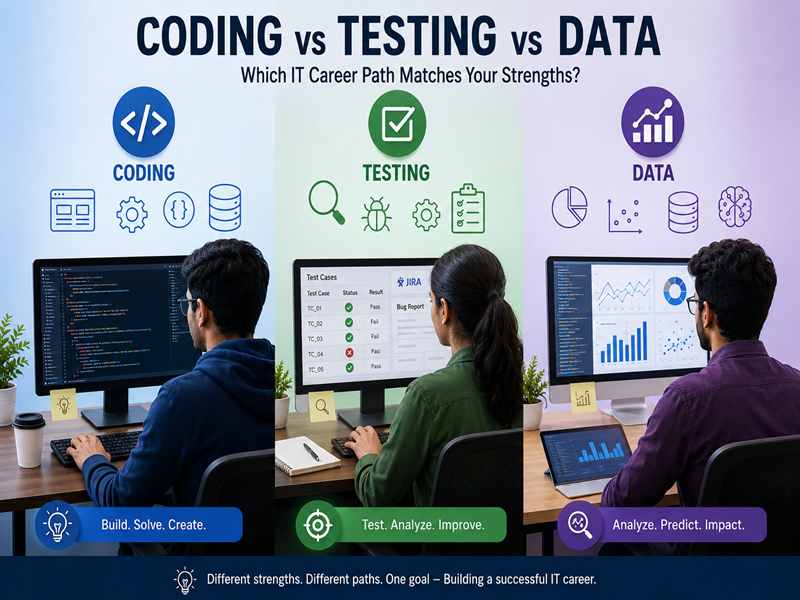
Coding vs Testing vs Data: Which IT Career Path Matches Your Strengths?
Choosing an IT career path can feel confusing for freshers. There are many courses and career options available. So, how do you know which one is right for you? Some people enjoy building applications. Others enjoy finding errors and improving software. Some prefer numbers, data, and patterns. This guide compares Coding, Software Testing, and Data. It will help you choose an IT career path based on your strengths and interests. Why Choosing the Right IT Career Path Matters Every IT career needs logical thinking. However, each field requires a different mindset. Coding suits people who enjoy building and solving problems. Testing suits people who notice details and enjoy finding errors. Data suits people who enjoy numbers, patterns, and analysis. Choosing a career that matches your strengths can make learning easier. It can also make your work more enjoyable in the long run. Path 1: Coding and Full Stack Development Do you enjoy creating things from scratch? Do you like solving problems and seeing your ideas become working applications? If yes, Full Stack Development could be a good career option for you. Coding May Suit You If You: What Does a Full Stack Developer Do? A Full Stack Java Developer can work on different parts of an application. Common technologies include: The role involves building, testing, and improving applications. Consider This Before Choosing Coding Coding requires patience. Your code may not work correctly on the first attempt. You may spend time finding and fixing errors. Therefore, you should be comfortable with trial and error. Path 2: Software Testing Do you naturally notice small mistakes? Do you often ask, “What could go wrong?” If so, Software Testing may be a good fit. Software testers check applications to make sure they work correctly. They identify bugs and help improve software quality. Testing May Suit You If You: What Does a Software Tester Do? Software testers use manual and automated testing methods. Common tools and technologies include: Testers check software from different angles. They also look for situations that developers may miss. Consider This Before Choosing Testing Testing involves more evaluation than creation. If you prefer building applications from scratch, coding may be a better fit. However, if you enjoy finding problems and improving software, testing can be rewarding. Path 3: Data Science and Data Analytics Do you enjoy numbers and patterns? Do you like understanding why something happened? If yes, Data Science or Data Analytics could be the right career path. Data professionals use information to find useful insights. Companies can then use these insights to make better decisions. Data May Suit You If You: What Does a Data Professional Do? Data Science combines programming, statistics, and data analysis. Data Analytics focuses more on studying existing data and finding trends. Common areas include: Consider This Before Choosing Data Data careers require comfort with numbers and analysis. You do not need to be a mathematics expert. However, you should be willing to learn basic mathematical and statistical concepts. Coding vs Testing vs Data: Which Is Right for You? Use these simple questions to understand your strengths. Do you enjoy building things?→ Coding may be a good fit. Do you naturally notice errors?→ Software Testing may suit you. Do you enjoy numbers and patterns?→ Data may be the right choice. Do you enjoy creative problem-solving?→ Coding could be a strong option. Do you prefer structured and detail-focused work?→ Testing may suit you. Do you enjoy analyzing information?→ Data could be a good choice. There is no single best IT career path. The right choice depends on your interests, strengths, and career goals. What If You Are Still Not Sure? It is normal to feel confused when choosing your first IT career. You can take a few simple steps before joining a course. Try Free Tutorials Explore basic tutorials for coding, testing, and data. Spend a few days with each field. This can help you understand which type of work you enjoy. Talk to IT Professionals Speak with people already working in these roles. Ask them about their daily tasks, challenges, and career growth. Think About Your Strengths Consider the subjects and activities you enjoyed during school or college. For example: These are not strict rules. However, they can help you understand your natural preferences. Choose Practical Training Once you identify an area you enjoy, look for a training program that includes practical learning. Projects and hands-on practice can help you understand whether the career is right for you. Final Thoughts Coding, Testing, and Data are all valuable IT career paths. Coding is a good option for builders and problem-solvers. Testing can suit detail-oriented people who enjoy finding and fixing problems. Data can suit people who enjoy numbers, patterns, and analysis. The best IT career path is not the one that is most popular. It is the one that matches your strengths and interests. Take time to understand yourself before choosing a course. Learn the basics, practice regularly, and choose a path that you can see yourself growing in.